My Chaotic CS2 Surrender Vote Saga
Master the CS2 surrender vote and learn how to surrender in CS2 when your team is down a player.
I’ve had more than my fair share of chaotic Counter-Strike 2 matches in 2026, but none stick in my memory quite like the one where I learned the hard way how surrender votes work—turns out, it’s not just a button you mash when you’re tired of getting domed by a guy with a $2000 AWP. Let’s rewind to last Tuesday: my team was down a player 30 seconds into the first round of Inferno, our random teammate had rage-quit mid-spawn after I accidentally flashed him (oops), and the enemy team was already camping our B site like vultures circling a dying wildebeest. I was this close to just closing the game and replaying Stardew Valley, but then I remembered: CS2 has a surrender system, right?
First, let’s get the basics straight—if you’re still rocking a full 5-player squad, don’t even bother trying to surrender. It’s like trying to convince a pizza delivery guy to give you a free pie just because you asked; it’s not happening. The vote will fail faster than a noob trying to defuse a bomb without a kit. But if you’re down a player, here’s the step-by-step I fumbled through:
-
Press Esc to open the in-game menu (duh, but I panicked and hit Tab first, which just showed me how badly I was losing)
-
Select the Call Vote option (it’s tucked under the ‘Match’ tab, easy to miss if you’re panicking)
-
Choose Surrender from the list of vote types (other options are kicking teammates, which I was this close to picking for the guy who flashed me)
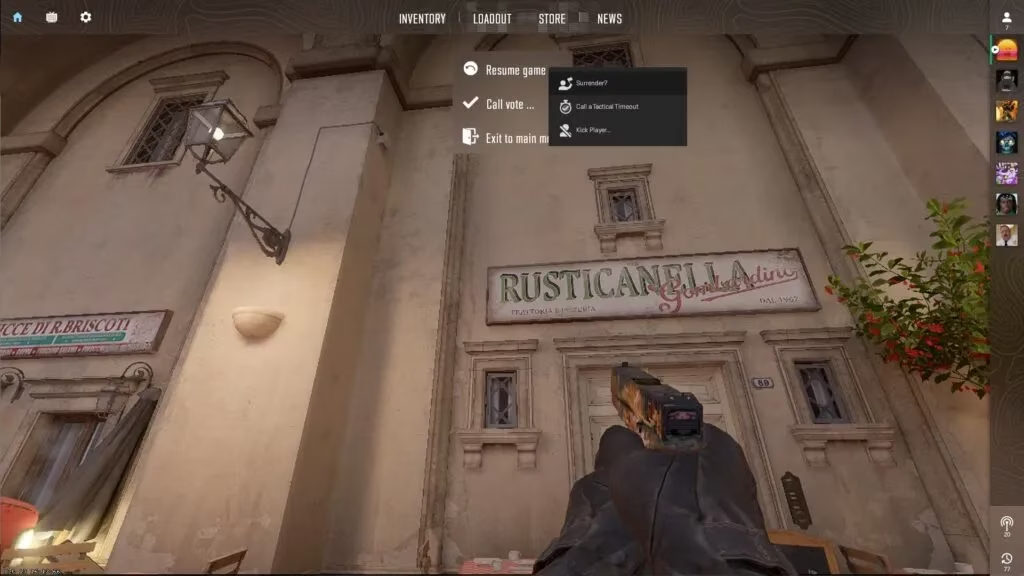
Once I called the vote, a little box popped up on the right side of my screen—super easy to miss if you’re busy hiding behind a crate from an enemy AWP. My teammates had to press F1 for Yes or F2 for No, and I held my breath. Now, here’s the thing I almost forgot: back when CS2 first launched, surrender votes were a joke. One person could vote Yes and end the game, which meant a single salty teammate could ruin a match for everyone. But Valve fixed that in an October 8 patch, so now you need a majority of your team to agree. That’s a good thing, right? Well, not when your teammates are stubborn.
My first vote failed. One of my teammates voted No, yelling over comms that we could “come back” (we were 0-7, down a player, and the enemy team had a $12,000 economy). I wanted to scream. So I called another vote. This time, I begged over comms: “Guys, if we don’t surrender, I’m going to throw my keyboard out the window.” That did the trick—two of them voted Yes, one voted No, and the vote passed. The game ended, we got a loss, and I was taken to the post-match screen, where I immediately queued for another match, hoping for a better team.
I’ve had a few more surrender moments since then. Last week, I was on the receiving end of a surrender vote when my team was down a player, and I almost voted No just to prove a point—until I realized the enemy team was camping our spawn like a cat waiting for a mouse to come out of its hole. I hit F1 faster than I’ve ever hit a key in my life.
If you’re new to CS2, or just forgetful like me, here’s a quick cheat sheet to remember:
| Rule | Details |
|---|---|
| When can you surrender? | Only if your team is down a player |
| How to call a vote | Esc > Call Vote > Surrender |
| How to vote | F1 = Yes, F2 = No |
| What’s needed to pass? | Majority of your team votes Yes |
I still have a love-hate relationship with the surrender system. On one hand, it’s a lifesaver when you’re stuck in a hopeless match. On the other, it’s a reminder that sometimes, you just can’t win. But hey, at least it’s better than the old days of CS:GO, where you had to sit through a 30-minute match even if you were down a player. Now, you can cut your losses and move on to the next game, where hopefully, your team doesn’t rage-quit 30 seconds in.
Just remember: if you’re ever in a hopeless CS2 match, don’t be like me and panic. Follow the steps, beg your teammates if you have to, and hit that surrender vote. Your keyboard will thank you.